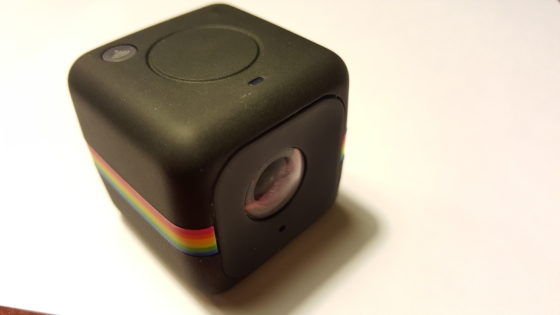
I took the Polaroid Cube+ out for a spin today and I can already think of some fun applications for it. I’m thinking of how we can incorporate using it in Built From Bricks. It can certainly find the tight spots that I can’t get into with the full size camera. I like that it has a magnet on it and I can stick it anywhere. although I probably won’t be sticking it to rusty pipes anymore. I’m still pulling rust off the magnet.
Thanks again Mantripping.com for the fun Twitter Party.
A couple of months ago I won a Polaroid Prize Pack from a Twitter party hosted by Mantripping.com. The prize pack consisted of a Polaroid Zip printer, a Polaroid Cube+ and a Polaroid Snaptouch camera. These are really cool and I think that they will be a lot of fun on the upcoming trip to New Hampshire for Spring Break. It will also be fun to bring these along to Philly Brickfest Live. The Polaroid Cube+ can Livestream so that will be interesting to use at some point while filming built From Bricks or for something else. I’m not sure exactly how to use everything yet, but I will.
Filming today’s video was an absolute mess. Well, afterwards it was a mess. I was opening the Polaroid Snaptouch and it slipped out of my hands and landed on the floor. I think it still works but part of it popped open and it wasn’t the part that is supposed to open. hopefully it will still work. Then, after I took today’s photo I knocked over the new light that stays behind me when I make videos and I shattered the lightbulb. I’ve got to go and order a new one. That smashed real good.
My friend Linsey asked me how I was getting a certain effect to my photos recently. She wanted to know what I was using and the answer was super simple. I bought two pieces of posterboard that had a two tone color to them. One is blue to yellow and the other is yellow to pink. I’ve been using them for a while now and I am noticing that my photos are looking very much the same. They are better for filming and for showcasing the toys. I’ll be picking up some more posterboard soon in different colors to match the different toys better.
So the technique is placing the posterboard down at a curve so that there are no angles. Then the light makes the poster a bit shiny at the curve. I’m going to figure out better ways to use these and the lights that I use for filming my videos. As I learn more I will make more videos like the one below.
As part of the Imagelogger program I often get to check out some great Samsung products. I recently received a brand new Samsung Portable SSD T1. This solid state drive is a 500GB powerhouse in a smaller than credit card sized package. What an incredible piece of tech and I’m so excited to have been able to receive one to back up all of the great photos that I’ve been shooting with the Samsung NX cameras. This drive is also fast enough where I can edit my 4K videos right off the drive. I made a video unboxing of the drive, too.
I took my NX1 down the street tonight to take some photos of the lights that one of my neighbors has. He always decorates big for Christmas and Halloween. I took my NX1 and a tripod and set up on the sidewalk to attempt to get some good light’s photos. I wanted to get that starburst glow pattern from the lights. You can get that from a long exposure and a bunch of other factors. I’m not the best at explaining how it all works together but I can figure it out most of the time. You’ll have to click on today’s image above to see what I mean, check out the lights at the bottom of the photo. Those have the starburst pattern to them.
Throughout the week I am photographing with many cameras for the Imagelogger program. Right now I’m shooting at least 5 photos a week with three different cameras (NX3000, NXMini & NX30). Sometimes the week gets away from me a bit and I don’t get the best chance to get out and shoot. Today I took Andrew and all three cameras for a walk around the Audubon trail at La Salette. I was primarily shooting with the NX30. Andrew was interested in taking pictures today so I let him use my NX3000. He was so excited to walk around taking photos.
Eva was about 2 1/2 when I first let her use a camera. She was so excited about it. Andrew was also excited about getting his hands on a camera. We walked around the trail and he was shooting all sorts of things. Most of the photos are out of focus because he was taking photos while walking. Continue reading Sparking the Interest of a New Photographer→
We have a tree in our back yard. Two actually but one of them has these beautiful white blossoms. I love watching them come to life. I’m not a fan of the day when it pours down hard rain and knocks them all apart.
I attempted to take this Macro shot on the way to work. I wasn’t able to really take my time with it and this was the best one of the bunch. I’d better practice since it is starting to be that time of year when the flowers start blooming and I start taking more macro shots.
For the past couple of months I’ve had an HTC One X+ phone to use and review and also to go and do missions. I also took the phone with me to Toy Fair and took a ton of photos and tweeted them all over the place using the phone. I love many features of this phone’s camera and photography software. My favorite and most used feature of the cameraphone was the burst shooting. When you go to take a photo and hold the shutter button down the phone will take 20 shots right in a row and allow you to pull the best image from the set and automatically delete the other images. This is why two of my top three photos were made while using the burst function.
I’m learning about so many different apps for the iPhone which have to do with enhancing your photographs. While the phone itself takes great photos you can turn the phone into a little studio with a few additional apps as well. The first one that comes to mind is Instagram. Instagram allows iPhone photographers the ability to set different filters to each image and also sift the emphasis of the focus on each image. The one thing I don’t like it that I can’t enhance a photo and just save it I have to post it to Instagram.
The next app that I use often now is Diptic. With this program you can take multiple images and put them together to make one full image so you can tell a story. There are a ton of templates that you can use and then you can adjust the size of each cell to make custom templates (you can’t save them though). There are also additional adjustments that you can make to each image including filters in each cell or you can apply the filter to all cells or to a single cell.
The most recent app I’ve come to enjoy is Over. With OVer you can add text to your images. I’ve been having so much fun with these apps. Do you know of others?
This kid is always watching, taking everything in. He is growing and changing every single day. I’m doing a little personal project with Andrew. I’m taking a photo of him each day for us. I’m using the amazing photo a day site ShutterCal to do it. That way friends and family can see Andrew’s progress for the next year. I wish I had thought of doing something like this for Eva. I may actually have a photo from every single day of her first year as well. Continue reading I’ve Been Watching You→