Tag Archives: Photo

Easy Photo Tips – Inexpensive Backgrounds

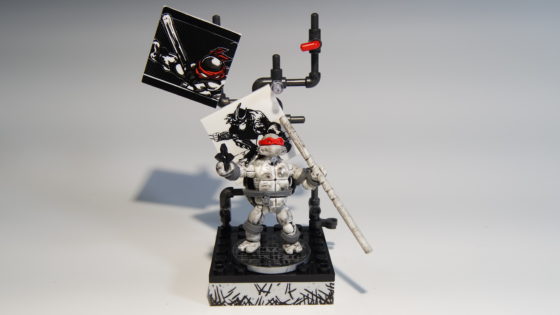
Classic Comicbook Donatello
Photo-A-Day #4359

My friend Linsey asked me how I was getting a certain effect to my photos recently. She wanted to know what I was using and the answer was super simple. I bought two pieces of posterboard that had a two tone color to them. One is blue to yellow and the other is yellow to pink. I’ve been using them for a while now and I am noticing that my photos are looking very much the same. They are better for filming and for showcasing the toys. I’ll be picking up some more posterboard soon in different colors to match the different toys better.

So the technique is placing the posterboard down at a curve so that there are no angles. Then the light makes the poster a bit shiny at the curve. I’m going to figure out better ways to use these and the lights that I use for filming my videos. As I learn more I will make more videos like the one below.
Let There Be Light – How I Light my Vlog – New Equipment Haul

Lightng
Photo-A-Day #4337

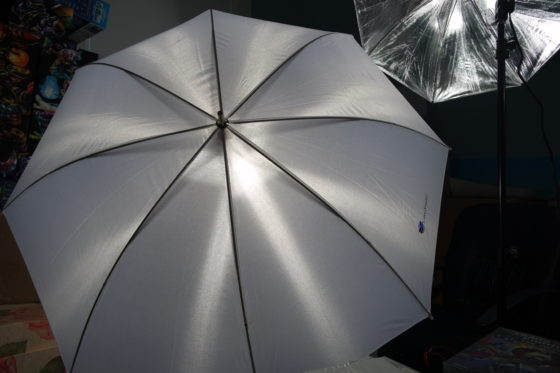
It was well past time for me to get some more professional lighting in my office so that I can make better looking video. I picked up the LimoStudio 600W Photography Triple Photo Umbrella Lighting Kit, Video, Umbrella Continuous Lighting Kit, CFL Photo Bulbs, Black/Silver & White Umbrella Reflector, Light Stand, Carrying Case, AGG2263 from Amazon.com through one of my favorite podcaster’s Amazon.com affiliate link.

I’m just learning how to do all of this and so the process will be a bit slow, I’ll make mistakes and will, hopefully, learn from them. I’ll certainly pass along what I’ve learned to you!

Last Minute Thoughtful Gifts? It Can be Done With The Kodak Picture Kiosk

At The Kodak Kiosk

Each year I help my parents with their annual Christmas Letter. The letter actually becomes a family affair. Dad writes it, Mom edits it, Allison proofs it, Tara proofs it and I reformat, set it up and add photos. I’ve also been known to rewrite, design and print the letter also. In past years this has been a sort of frustrating affair. The deadline rockets up on us, printers jam, computers crash and tensions run high. That is until we discovered the Kodak Picture Kiosk. Continue reading Last Minute Thoughtful Gifts? It Can be Done With The Kodak Picture Kiosk

Wireless Video Chat via Digital Photo Frame

mf801vertical

I take a ton of pictures and many I post to this blog. Many more I post to Flickr and some, I don’t post at all. Because I take so many pictures and consider myself a bit of a photographer we suffer from the “Cobbler’s Kids Syndrome”. This means that there are hardly any photos hanging up in our home. The perfect product for us is a Digital Picture Frame from Digital Spectrum Solutions.

A simple digital frame won’t work for us though. We would really benefit from a wireless digital picture frame. I’ll tell you why. A digital picture frame that is wireless would allow us to easily connect the frame to our in home network. We can also sign up for a FrameChannel account and then determine which photos would automatically stream to our frame. We could incorporate images from Facebook, Flickr, Picasa and many more online sites. In our own house we could even use our home computer to send images directly to the frame. This option would probably be the best choice for us since I edit my images and then place them right onto the computer. Unfortunately that is usually where they stay, too.

Digital Spectrum Solutions takes wireless digital photo frames a leap further though. They have a new digital photo frame that is coming out this summer that will allow users to video chat frame to frame. Yes, just using the photo frame you can chat with friends and family. I can see this as an amazing opportunity for Allison and Eva to interact with Allison’s parents. We can set them up with a direct feed to photos of Eva with the wireless feature and a FrameChannel.com account. Then they can video chat with each other through the frame whenever they would like.

Here is a video of the video chat through a digital picture frame in action. The image quality on the frame is pretty decent and I think that with every sort of video chat program you do need to use a microphone to get the best sound and no echo. I’d really like to try one of these frames out.

If you can’t wait for the video option but would like a great wireless frame then here are some specifications on one of the Digital Spectrum Solutions wireless frames. This is the MemoryFrame MF-8104:40101brwnsm

  • Patented changeable standard 8×10” frame to suit your decor
  • Generous internal memory
  • Built-in multi format card reader
  • Embedded 802.11b/g wireless connectivity
  • Share pictures with Windows Vista or XP
  • Web enabled for photo sharing
  • Bluetooth enabled
  • Plays WMA audio files
  • Plays WMV video files
  • Automatic slideshow
  • Audio slideshow
  • Built-in stereo speakers
  • USB to PC
  • USB to thumb drive, camera, etc.
  • Automatic firmware update for latest additions
  • Remote control for convenient use
  • Desk top or wall mount
  • Removable desktop stand

That is one heck of a set of features. Add video chat to that and you have one amazing digital picture frame for your home. If you want to find a great digital picture frame for your family take a look at Digital Spectrum solutions, their site is complete with great information, resources and products at reasonable prices.

Buff, Buff, Buff!

Buff, Buff, Buff!
Photo-A-Day #1420

The other day our friend Mo of We’re in a Fight, told us that the woman behind Bare Escentuals was looking for pictures of people who use the product. Well, Allison uses the product. She uses the heck out of it. she has all sorts of containers and brushes and many things that are a complete mystery to me. She even has them all labeled.

Eva watches Allison apply her makeup and Allison gave Eva one of her worn out brushes. I didn’t even realize these things could wear out but they do. Eva takes the brush and brushes her cheeks and says “buff, buff, buff”. This is part of that secret application process that I am perfectly fine being clueless about. We’ve tried to get Eva to do the “buff, buff, buff” thing on camera but she’s a difficult one to catch when you want her to do something specific. Believe em she does a bunch of cute stuff but if you aren’t right there at that exact moment with the camera you aren’t getting a repeat performance.

Case in point, tonight Eva said her name for the 1st time. She said it clear as day and said it many times. I rushed into the bedroom where Allison and Eva were talking and fumbled with Allison’s camera to make it do video. I did catch her saying it but what was funny was that each time Allison said, “Say your name” Eva would say “Name” Then she would say “Nate” and then pick some other word. Eventually she got back around to “Eva” and it was so cute! She really stresses the “E” and totally drags out the whole name to make it sound like a name much longer than 3 letters.

Back to the photos. Allison was trying to take some photos of Eva with her camera and the Xshot for this task but Eva was being squirmy. The Xshot is a great product but sometimes a wiggly kid makes things difficult. So, I grabbed my camera. It still had the telephoto lens on it which actually worked in this base because it didn’t distract Eva. However, and here is a Photography Tip: Check your settings before you start firing. I’ve been trying to get off auto lately and so I had my camera set on manual. The lighting was great but the speed was too slow so my 1st 10 photos were totally blurry. Those were the best ones overall too. Eva was still enjoying playing and wasn’t being fussy. Once I realized my mistake I just flipped quickly to auto to fire off some more shots. This was the one I ended up with, best of the bunch.

Ugh and I cropped my image at 1/4 usual size. Great. I’ll fix tomorrow with larger photo.

Photo-A-Day #717 03/26/07

Sunrise at Logan Airport

Getting up in the early early morning has some benefits. Shorter lines at the airport, and occasionally I get a great sunrise to look at. I’ve been thinking about the upcoming Photo contest on FuelMyBlog and the theme is “My Window on the World”. So that was my window on the world today and many other days. Maybe I should submit it. Continue reading Photo-A-Day #717 03/26/07

Photo-A-Day #700 03/09/07

Allison and I pose with the QuikPod

Today’s photo was taken by me using a great new device that I just received in the mail. I learned about this from Cali Lewis on GeekBrief.tv. It is called the QuikPod and I wrote a great post about it on Flatwater. I used the QuikPod for today’s Photo-A-Day and a few other things that I am working on and am very excited that it arrived before the weekend. So now I can try using it while I am on my snowshoeing trip this weekend. Continue reading Photo-A-Day #700 03/09/07